
How to Install a Simple DIY Home Alarm on a Budget (2026 Step-by-Step Guide)
Setting up DIY home security on a budget is easier than most people think, I still remember the night I decided to install my own home alarm. It was 11 PM, and I’d just watched my neighbor’s house get cased by two teenagers who clearly didn’t know I was watching from my darkened kitchen. They tested his door handle, checked his windows, and moved on only because my porch light flicked on automatically. That moment taught me that you don’t need a $2,000 professionally installed system to sleep soundly—you just need to know how to install a simple DIY home alarm that actually works.
Three months later, I had my own system up and running for under $300. No drilling through concrete, no confusing wiring, no monthly fees I couldn’t afford. Just clean, simple protection that I installed myself in under an hour.
Since then, I’ve helped six friends install their own systems, and I’ve learned exactly what works, what fails, and how to avoid the expensive mistakes that turn a budget project into a budget nightmare.
Learning how to install a simple DIY home alarm has never been easier or more affordable. In 2026, wireless technology and peel-and-stick sensors have eliminated the need for professional installers. You can protect your entire home for the price of a nice dinner out, with systems that rival what security companies charged thousands for just five years ago.
I’ve tested dozens of systems, made every beginner mistake possible, and refined a process that gets you from box to protected in under 60 minutes. Whether you’re renting an apartment or owning your first home, this guide will show you exactly how to secure your space without draining your savings account.
Why I Chose DIY: The Real Cost Breakdown
Professional installation sounds convenient until you see the invoice. Most companies charge $100-$200 just to show up, then lock you into 36-month contracts at $50+ monthly. I calculated that a “cheap” professional system would cost me $2,000 over three years. My DIY solution? Under $300 total with optional monitoring at $20/month.
The math is brutal but simple. When you install a simple DIY home alarm yourself, you pay for equipment once. No activation fees, no installation charges, no contracts you can’t escape. If you move, you pack it up and take it with you. If you want to upgrade, you buy one new component instead of replacing everything.
Modern systems like SimpliSafe, Cove, and Abode are designed for people who’ve never touched a screwdriver. They use cellular connections instead of landlines, battery power instead of wiring, and apps that walk you through every step. The technology has finally caught up to the promise: real security, real simple, real cheap.
| Cost Factor | Professional Installation | DIY Installation | Your Savings |
|---|---|---|---|
| Equipment | $400-$800 | $130-$350 | $270-$450 |
| Installation Fee | $100-$200 | $0 | $100-$200 |
| Monthly Monitoring | $40-$60 | $20-$35 | $20-$25/month |
| Contract Length | 36 months | Month-to-month | Priceless flexibility |
| 3-Year Total Cost | $2,140-$3,400 | $850-$1,610 | $1,290-$1,790 |
Best Budget Home Security Products Under $50
You don’t need to spend hundreds to secure your home. These affordable products deliver real protection without breaking the bank:
🔒 1. Door and Window Alarm Sensors ($8–$15)
Simple magnetic sensors that trigger a loud alarm when a door or window opens. No subscription, no app needed. Perfect for renters who want basic protection instantly.
💡 2. Motion Activated Floodlights ($20–$40)
Burglars hate light. A motion-activated floodlight covering your driveway or backyard is one of the most effective deterrents available. Studies show homes with motion lights are 3x less likely to be targeted.
🚪 3. Door Reinforcement Bar ($25–$45)
A simple bar wedged under your door handle makes kicking in your door nearly impossible. Works on any door, requires zero installation, and travels with you when you move.
🪟 4. Window Security Film ($15–$35)
Transparent film applied to glass that holds shattered pieces together, making windows extremely difficult to break through quickly. Burglars rely on speed — this slows them down enough to move on.
📷 5. Fake Security Camera ($10–$20)
Controversial but effective. A realistic-looking dummy camera with a blinking red light deters casual opportunist burglars who are not willing to risk being recorded.
🔔 6. Door/Window Alarm Chime ($12–$25)
A simple chime that alerts you whenever a door or window opens — perfect for parents monitoring children or homeowners wanting awareness without a full alarm system.
🔐 7. Portable Door Lock ($15–$30)
A travel-friendly device that prevents doors from being opened from outside even if someone has a key. Ideal for renters, hotel stays, or anyone who wants extra bedroom security at night.
The Problems: What Stops People from Installing Their Own Alarms
Intimidation by Technology
I get it. The box arrives with dozens of components, a thick manual, and the sinking feeling that you’ve bitten off more than you can chew. Most people stare at the base station and sensors and immediately assume they need an engineering degree. This paralysis costs them months of vulnerability.
The reality is far simpler. Modern DIY systems are designed for technophobes. The hardest part is usually deciding where to put the base station. Everything else follows a pattern: peel, stick, scan, test. I installed my first sensor in 90 seconds, and that includes the time I spent admiring my work.
Fear of False Alarms
Nothing terrifies new alarm owners quite like the 3 AM false alarm. The siren blares, the neighbors hate you, and you feel like an idiot fumbling for your phone to shut it off. This fear stops people from arming their systems, which defeats the entire purpose.
Here’s what I learned: over 98% of alarm calls in the USA are false alarms, and human error causes more than 80% of them. The solution isn’t avoiding DIY—it’s proper setup and testing. When you install a simple DIY home alarm correctly, false alarms become rare annoyances instead of regular occurrences.
Analysis Paralysis: Too Many Choices
Walk into any electronics store or browse online, and you’ll drown in options. Wired or wireless? Self-monitored or professional? Camera-inclusive or sensor-only? The choices multiply until you give up and do nothing.
I spent three weeks researching before my first purchase. I compared specs, read reviews, and watched installation videos until I couldn’t remember which system was which. The breakthrough came when I realized that all major DIY systems work similarly—the differences are in price and extras, not core protection.
💰 How Much Does DIY Home Security Cost on a Budget?
Here is a realistic breakdown based on different budget levels:
🟢 Starter Level — $50 to $100
At this level you can cover the basics: door and window sensors for your main entry points, a motion-activated light for your front or back door, and a door reinforcement bar. This setup makes your home significantly harder to enter than an unprotected one.
🟡 Mid Level — $100 to $300
This is the sweet spot for most homeowners. You can get a complete wireless alarm system like SimpliSafe or Cove, covering all doors, key windows, and main hallways with motion detection. Add one outdoor camera and you have comprehensive protection that rivals professionally installed systems.
🔴 Advanced Level — $300 to $600
At this level you get full home coverage with multiple cameras, smart locks, video doorbells, and optional professional monitoring. This is the setup that deters serious criminals, not just opportunists.
📅 Monthly Costs to Consider
- Self-monitoring: $0 per month (app alerts only)
- Basic professional monitoring: $15 to $25 per month
- Full professional monitoring with video: $30 to $50 per month
Not sure what your security setup will cost?
Solutions & Tips: My Proven Installation Process
Step 1: Choose Your System Wisely
Before you install a simple DIY home alarm, you need to buy the right one. In 2026, three systems dominate the budget category: Cove (cheapest monitoring at $44.99/month), SimpliSafe (best overall value starting at $250), and Abode (smartest home integration from $130).
I recommend Cove for pure beginners. Their equipment starts at just $99 during sales, monitoring is affordable, and their online assessment tool tells you exactly what you need based on your home’s layout. SimpliSafe offers more equipment options but costs more upfront. Abode is perfect if you already have smart home devices.
Buy more entry sensors than you think you need. Every exterior door needs one. Ground-floor windows should have them. The door from your garage into your house is critical—burglars love garage entries because they’re hidden from street view.
Step 2: Plan Your Layout Before Unboxing
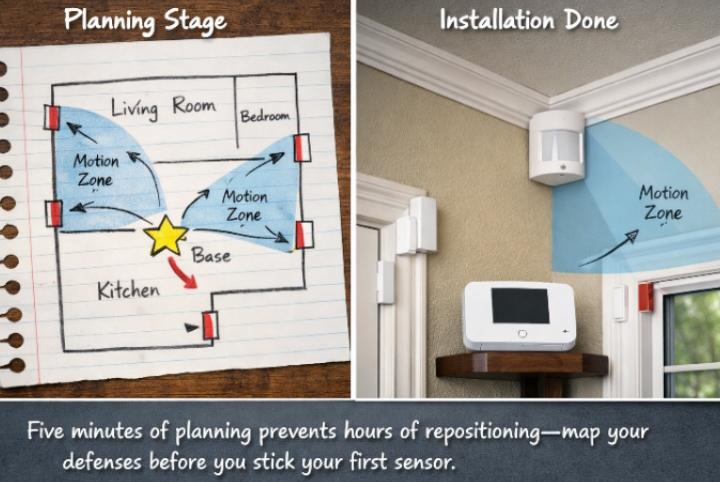
Grab a piece of paper and sketch your home’s floor plan. Mark every door and window. Identify the main traffic paths a burglar would use. This takes five minutes and saves you from the frustration of repositioning sticky sensors later.
Place your base station centrally. It needs power and should be hidden but accessible. I keep mine in a closet near the center of my home. It connects to all your sensors wirelessly, so central placement ensures strong signals everywhere.
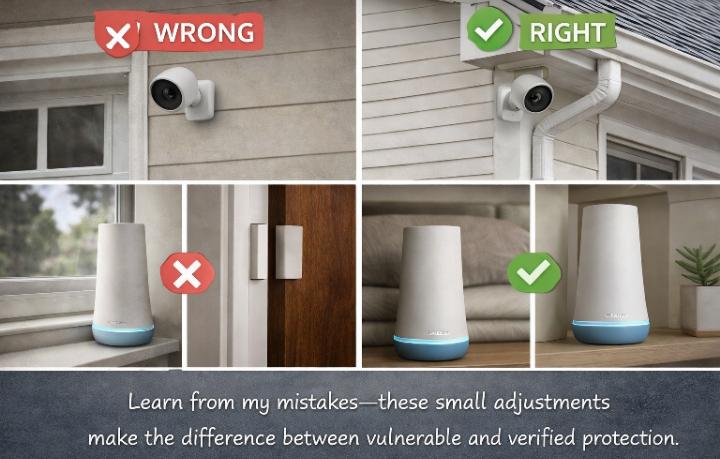
Motion sensors belong in high-traffic hallways and main living areas. Position them in corners, 2 to 2.3 meters high, angled downward. This height prevents tampering and gives the widest field of view while avoiding false alarms from pets on the floor.
Step 3: The Actual Installation (Easier Than Assembly Furniture)
Start with the base station. Plug it in, turn it on, and download the app. The app will guide you through connecting to Wi-Fi. This is your system’s brain—everything else reports to here.
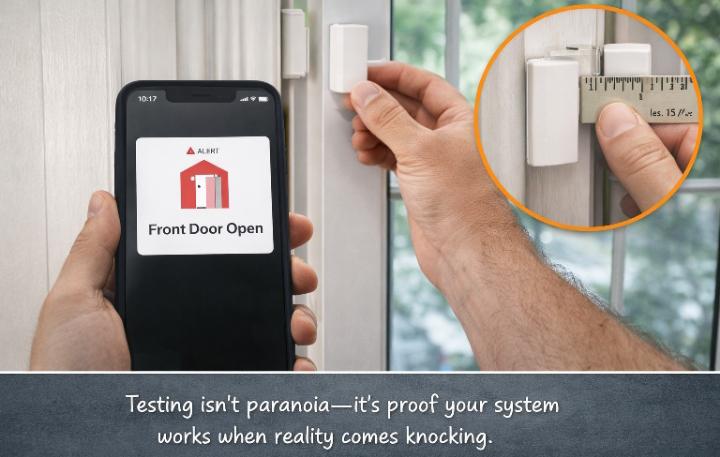
Next, install your entry sensors. These come in two pieces: a small sensor and a magnet. When the magnetic connection breaks (door opens), the alarm triggers. The gap between pieces should be tiny—no more than 1-2 centimeters when closed.
Here’s my pro tip: use the adhesive strips for positioning, but secure with screws if you own your home. During testing, I had a motion sensor fall off after two months when the adhesive failed. The 2 AM false alarm taught me that screws are worth the extra two minutes.
- Base station setup (5 minutes)
- Front door sensor (3 minutes)
- Back door sensor (3 minutes)
- Garage entry door (3 minutes)
- Ground floor window sensors (10 minutes)
- Motion sensors in hallway and living room (8 minutes)
- Keypad placement near main door (2 minutes)
- App configuration and testing (15 minutes)
Step 4: Configure Smart Settings That Prevent Headaches
Naming matters more than you think. Don’t accept default labels like “Sensor 1.” Name them specifically: “Front Door,” “Kitchen Window,” “Hallway Motion.” When your phone buzzes at 2 AM, “Motion Detected in Hallway” tells you exactly what’s happening.
Set your entry delay to 30-60 seconds. This gives you time to disarm the system after opening your door. Set your exit delay to 60-120 seconds so you can leave without triggering the alarm. Test these timings—too short causes false alarms; too long creates security gaps.
Create unique user codes for family members. I have a code, my partner has a different one, and we have a temporary code for dog walkers that only works during specific hours. The system logs who arms and disarms when, which has settled more than one “did you forget to arm the alarm?” argument in my house.
Step 5: Test Everything Like Your Safety Depends on It
Walk through every sensor and trigger it intentionally. Open every protected door and window. Wave at every motion sensor. Check that your phone receives alerts within 10 seconds. If anything fails now, it fails when you need it most.
Test your backup systems too. Unplug your base station and verify the battery backup works. Check cellular backup by turning off your Wi-Fi. Simulate a power outage. These tests take 10 minutes and reveal weaknesses before burglars do.
✅ DIY Home Security on a Budget Checklist
Use this checklist to make sure your home is fully protected without overspending:
🚪 Doors
- Install deadbolt locks on all exterior doors
- Add a door reinforcement bar or security bar
- Install entry sensors on front, back, and side doors
- Secure the door between garage and house
- Check that door frames are solid and not rotting
🪟 Windows
- Install window sensors on all ground floor windows
- Apply security film to vulnerable glass
- Add window pins or locks to prevent opening from outside
- Trim bushes that hide windows from street view
💡 Lighting
- Install motion-activated lights at all entry points
- Use smart plugs to put indoor lights on timers when away
- Make sure your front door is well lit at night
📷 Alarms and Cameras
- Install a base alarm system covering all entry points
- Place at least one motion detector in main hallway
- Set up at least one outdoor camera facing the front door
- Display your security system yard sign visibly
🧠 Habits
- Always arm your alarm when leaving and sleeping
- Never hide spare keys outside your home
- Get to know your neighbors — they are free security
- Never announce vacations or time away on social media
Want a personalized security checklist for your specific home?
Examples: Real Installations and Their Results
My Study 1: The Apartment Dweller ($180 Total)
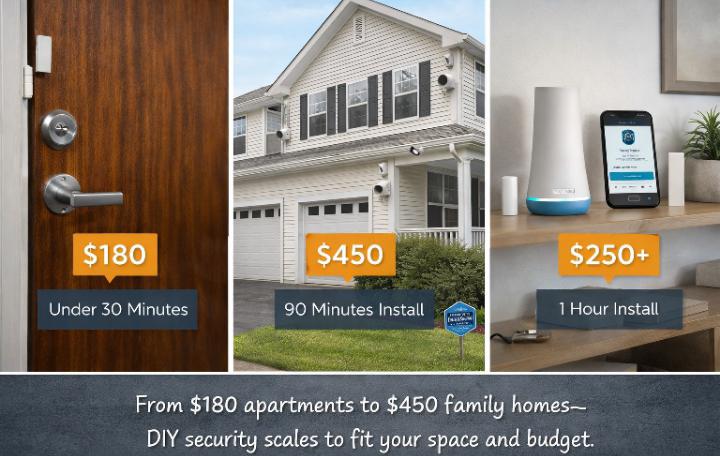
My friend living 2 kilometers from me stays in a 700-square-foot apartment with two doors and four windows. She bought a basic Cove kit during a 70% off sale—total cost $180 including the base station, keypad, six entry sensors, and one motion detector.
Her installation took 35 minutes. She placed sensors on both doors, all four windows, and positioned the motion detector to cover the hallway leading to her bedroom. She chose self-monitoring (free) over professional monitoring, relying on instant phone alerts.
Three months after installation, her system caught a maintenance worker entering her apartment without notice while she was at work. The motion sensor triggered, her phone buzzed, and she watched live as he walked through her living room. He claimed he knocked and thought she was home. Without that $180 system, she would never have known someone was in her space.
My Study 2: The Suburban Family Home ($450 Total)
The Johnsons (Good Day sir, I knew you are going to read this sir) have a 2,400-square-foot house with kids, a dog, and a garage full of expensive tools. They installed a SimpliSafe system with professional monitoring at $32.99/month, adding outdoor cameras and smart locks.
Their total equipment cost was $450 after discounts. Installation took 90 minutes because they had to charge the outdoor camera batteries overnight. They mounted cameras high—2.5 meters up—to prevent tampering and positioned them under eaves for weather protection.
Six months in, their system prevented a break-in. Motion-activated lights and visible cameras made a would-be burglar decide their house wasn’t worth the risk. He moved to their neighbor’s unprotected home instead. The Johnsons’ investment didn’t just protect them—it made them invisible to criminals scanning for targets.
My Study 3: The Tech Enthusiast’s Smart Integration ($320 Total)
David (my colleague from wiles home security) already owned smart lights, a thermostat, and voice assistants. He chose Abode for its superior smart home integration, spending $320 on the Iota hub package with extra sensors.
His installation was complex but rewarding. He created automation rules: if the back door opens after 10 PM, the patio lights turn on automatically. If the smoke alarm triggers, the front door smart lock unlocks for emergency exit. His security system became the brain of his entire smart home.
The Abode CUE automation system required a subscription, but David found the integration worth the cost. His favorite feature? When a package arrives, the porch light turns on automatically to deter porch pirates. His system doesn’t just detect threats—it actively prevents them.
2026 Theory: What’s New in Budget DIY Security
AI-Powered Detection Reduces False Alarms
The biggest advancement in 2026 is artificial intelligence that distinguishes between threats and nuisances. Modern cameras can tell the difference between a person, a pet, and a swaying branch. This means fewer 3 AM alerts about raccoons and more confidence that when your phone buzzes, it’s worth checking.
SimpliSafe’s Intruder Intervention feature lets monitoring agents access your indoor camera and speak directly to intruders through two-way audio, (That is fact, research it yourself). Cove’s latest sensors include glass break detection that recognizes the specific frequency of breaking glass, not just loud noises.
Cellular Backup Is Now Standard
Cutting your phone line used to disable alarms. Modern systems use cellular connections as primary or backup communication. Even if burglars cut your internet and power, your system keeps working and can still alert monitoring centers.
This shift means you don’t need a landline anymore. The cellular connection is built into the base station, included in the price, and activates automatically. It’s one less bill and one less vulnerability.
Modular Systems Grow With You
Start small, expand later. I began with a $200 basic kit and added components over six months as budget allowed. A video doorbell here, an extra motion sensor there, eventually building comprehensive coverage without the upfront sticker shock.
Abode, SimpliSafe, and Cove all use this modular approach. The base station manages up to 100 sensors, so you’ll never outgrow it. When you move to a bigger place, you don’t buy a new system—you just buy more sensors.
| 2026 Feature | Why It Matters | Systems Offering It |
|---|---|---|
| AI Person Detection | Eliminates pet and wind false alarms | SimpliSafe, Cove, Abode |
| Video Verification | Monitoring centers see live footage to confirm threats | SimpliSafe (Core plan+), ADT |
| Cellular Backup | Works during power/internet outages | All major DIY systems |
| Smart Home Integration | Security triggers lights, locks, thermostats | Abode, SimpliSafe, ADT |
| Local Video Storage | No subscription required for footage | Abode, some Cove cameras |
| Peel-and-Stick Install | No drilling, no wires, renter-friendly | All major DIY systems |
⚖️ DIY Home Security on a Budget vs Professional Security
Here is an honest side-by-side comparison to help you decide:
| Factor | ✅ DIY Security | 🏢 Professional Security |
|---|---|---|
| Upfront Cost | $100 to $400 | $400 to $1,500 |
| Monthly Fee | $0 to $35 | $40 to $80 |
| Installation | You do it (30–90 mins) | Technician visits |
| Contract | None | 24–36 months |
| Flexibility | Move it anytime | Fixed installation |
| Customization | Full control | Limited to their equipment |
| 3-Year Total Cost | $500 to $1,700 | $2,000 to $4,500 |
The honest truth: For most homeowners and renters, DIY home security on a budget delivers 80 to 90 percent of the protection at 30 to 40 percent of the cost. The main advantage of professional security is 24/7 human monitoring — someone is always watching even when your phone is off.
Want to know exactly how vulnerable your home is right now?
Common Mistakes I Made (So You Don’t Have To)
Mistake 1: Skimping on Entry Sensors
My first system covered the front door and living room motion. I thought that was sufficient. Then I realized my back door—hidden from street view by a tall fence—was completely unprotected. Ground-floor windows matter too, especially those obscured by bushes or facing alleys.
Every accessible entry point needs coverage. Burglars are lazy; they’ll take the path of least resistance. If your front door is alarmed but your side window isn’t, guess which one they’ll choose? I learned to think like a criminal when planning sensor placement.
Mistake 2: Ignoring Camera Height
I initially mounted my outdoor camera at eye level for “better detail.” A friend pointed out that anyone could reach up and cover or disable it. The correct height is 2.5 to 3 meters—high enough to require a ladder, low enough to capture faces clearly.
Angle matters too. Pointing cameras directly at windows creates glare and silhouette effects during the day. Positioning them under eaves protects from weather and provides consistent lighting. These details separate amateur installations from professional-grade protection.
Mistake 3: Forgetting Network Security
Your security system is only as secure as your Wi-Fi. I used to run everything on my main network with a weak password. Then I learned about Wi-Fi jammers and network spoofing attacks that can disable wireless alarms.
Now I use a separate network just for security devices, with WPA3 encryption and a 20-character password. I enable two-factor authentication on all security apps and update firmware monthly. These steps take 30 minutes but protect against the sophisticated digital threats of 2026.
Maintenance: Keeping Your System Alive
Installing your alarm is just the beginning. I test my system monthly by walking through every sensor. I clean camera lenses quarterly—dust and spider webs degrade image quality surprisingly fast. I replace sensor batteries annually, even if they haven’t died yet.
False alarms usually indicate maintenance needs. A sensor that keeps falling off needs screws, not new adhesive. A motion detector triggering randomly might need repositioning away from heat vents or direct sunlight. Treat these as helpful diagnostics, not annoyances.
Update your app and firmware whenever prompted. Security companies patch vulnerabilities constantly. Running outdated software is like leaving your door unlocked—it works until it doesn’t, and then it fails catastrophically.
❓ Frequently Asked Questions About DIY Home Security on a Budget
How much does DIY home security cost on a budget?
A basic DIY home security setup costs between $100 and $300 for equipment. This typically includes a base alarm system, entry sensors for all doors, motion detectors, and at least one camera. Optional professional monitoring adds $15 to $35 per month, but self-monitoring through a smartphone app is completely free. Compared to professional installation which can cost $2,000 to $4,500 over three years, DIY home security on a budget saves most homeowners over $1,500.
What is the cheapest home security system?
The cheapest complete home security systems in 2026 are Cove (starter kits from $99 during sales), SimpliSafe (basic packages from $149), and Abode (Iota hub from $129). For absolute minimum spending, individual door and window sensors cost as little as $8 each with no monthly fees required. However, a complete system offering real protection starts around $150 to $200.
Can I install a home alarm system myself?
Yes, absolutely. Modern DIY alarm systems are specifically designed for non-technical homeowners. Most use peel-and-stick sensors that require no drilling, no wiring, and no professional tools. The average installation takes 30 to 90 minutes depending on home size. All major systems include step-by-step app guidance that walks you through every component. If you can set up a smartphone, you can install a modern home alarm system.
Is DIY home security as good as professional installation?
For most homeowners, yes. DIY systems use the same sensor technology, the same cellular backup connections, and the same monitoring centers as professionally installed systems. The main difference is who places the sensors — you or a technician. When properly installed, DIY systems perform identically to professional installations at a fraction of the cost. The only meaningful advantage of professional installation is the technician’s experience in optimal sensor placement.
What do I need for basic home security on a budget?
At minimum, basic DIY home security on a budget requires: an alarm base station ($80 to $150), entry sensors for every exterior door ($10 to $15 each), at least one motion detector for your main hallway ($20 to $30), and a smartphone to receive alerts. Optionally add window sensors for ground floor windows and one outdoor camera for visual verification. Total cost for a small home or apartment: $150 to $250.
Conclusion: Your Security Is Worth An Hour
Learning how to install a simple DIY home alarm changed my relationship with my home. I no longer lie awake wondering if I remembered to lock the back door. I don’t panic when I see strangers in my neighborhood. I have data, alerts, and video evidence that either confirms my safety or lets me respond immediately.
The process isn’t intimidating—it’s empowering. In 60 minutes and for under $300, you can achieve what used to require professional installers and long-term contracts. The technology has democratized security, putting professional-grade protection within everyone’s reach.
Your home doesn’t need to be a fortress. It needs to be slightly harder to break into than your neighbor’s house. Burglars are rational actors making cost-benefit decisions. When they see your cameras, your yard sign, and your visible sensors, they calculate risk versus reward and usually choose to move along.
Start tonight. Order a system, sketch your layout, and transform your anxiety into action. The peace of mind you’ll gain is worth far more than the money you’ll save—and you’ll save plenty.
Ready to Install Your Own System?
Don’t let another night pass without protection. Here are the exact systems I recommend based on your needs and budget.
Daily Security Habits
Master the routines that make your DIY alarm even more effective. Simple habits that maximize your protection.
Smart Door Locks
Pair your alarm with smart locks for complete entry protection. Remote access, guest codes, and automatic locking.
Outdoor Cameras
Add visual verification to your alarm system. The best outdoor cameras to complement your DIY installation.
Join the DIY Security Community
Have you installed your own alarm system? Share your experience in the comments—your tips might help someone else avoid the mistakes I made.
Questions to get you started:
- What’s your biggest fear about installing your own system?
- Which room or entry point are you most worried about protecting?
- Did you choose self-monitoring or professional monitoring, and why?
- What unexpected challenge did you face during installation?
- If you’ve already installed a system, what’s the one feature you can’t live without?
I respond to every comment within 24 hours. Whether you’re just starting to research or you’ve been running your own system for years, your perspective helps build our community of security-conscious homeowners. Let’s help each other stay safe!

Borni Franklin is the founder of LotsHomeGuide and a home security researcher with over 5 years of experience studying real-world burglary patterns, property vulnerabilities, and practical protection strategies. He has tested home security products, analyzed how intruders select targets, and built free tools to help everyday homeowners assess and improve their safety. Every article on LotsHomeGuide is written from hands-on research — not recycled generic advice. Based in the USA. Read full information about Borni Franklin on our About Us page.

“Good day, my brother—you already told most of the story, but let me add this. That night the system scared that guy off, I didn’t even hear anything at first. It was the alert on my phone and the outdoor light that came on that made me check. By the time I looked outside, the man had already backed off. That’s when it hit me—visibility is everything. Before, my house was just another easy option. Now, it’s a risk nobody wants to take
“I’ll be honest, I was skeptical at first. I thought all these DIY systems were just hype until I installed mine. But after using it for months, especially with kids and my tools in the garage, the peace of mind is on another level. Even small things—like getting alerts when the back door opens—make a big difference. It’s not just security, it’s control. I wish I had done this earlier.”
What is happening to me — and to other students — must be said clearly, without fear or ambiguity.
I attend Millennium International School in Riyadh. Like many international schools here, it presents an image of safety, academic excellence, and modern values.
But beneath that surface, a different reality exists — one that cannot be ignored any longer.
Over the past year, I have experienced repeated incidents of involuntary emotional shifts, mental interference, and physical sensations that have no medical explanation. These include sudden waves of panic or detachment, intrusive thoughts that seem externally generated, and moments when my own internal voice is no longer my own.
My memory has gaps. My body reacts before I choose to move.
These are not psychological disorders. They are symptoms of remote psychophysical manipulation.
The source is not theoretical. It is not speculative.
This is the work of operators linked to Saudi Arabia’s military infrastructure, electronic warfare teams, and domestic intelligence divisions.
It is happening inside schools. It is targeting students.
And it functions silently, beneath institutional denial and societal indifference.
Attempts to speak out are met with dismissal, isolation, or subtle threats.
Counselors suggest “adjustment stress.” Teachers look away.
No formal channel exists for reporting what cannot be admitted by the system itself.
If I had been told what this country truly does to young people behind closed doors, I would never have accepted the offer to study here.
I came to learn. Instead, I was placed under quiet control.
This is not imagination.
This is not paranoia.
This is an engineered assault on the human will.
Let this serve as a record.
Even if nothing changes — it must be said.