10 Sure Secrets to Make Your Home Look Occupied Even When You’re Away
I’ve learned these “Secrets to Make Your Home Look Occupied Even When You’re Away” the hard way — after my neighbor got broken into while on holiday. Here’s everything I now do before leaving home.
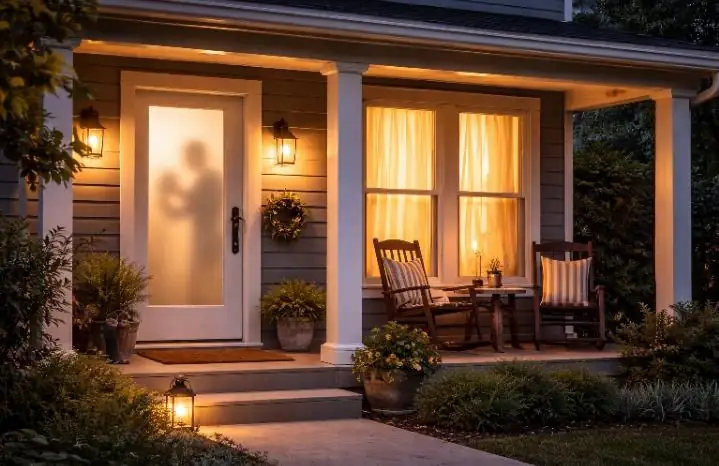
A few years back, my neighbor Jude — a quiet guy who lived three doors down — went on a two-week vacation to visit family. He turned off every light, drew all the blinds, and left. When he came back, his house had been broken into. The TV was gone. Laptop, gone. His kids’ PlayStation — gone. The burglars had clearly been watching the house for days.
That story shook me. I travel a lot — for work, for holidays, for short weekend getaways. And every single time I leave, there’s this nagging question in the back of my mind: “Does my house look empty right now?”
Burglars are not stupid. Most of them don’t just randomly pick a house. They scout. They watch. They look for the signs — the stacked mail, the dark windows every single night, the overgrown grass, the car that never moves. When they see those signs, they move in.
The good news? You don’t need an expensive alarm system or a live-in house sitter to protect your home. There are smart, practical, and surprisingly affordable things you can do to make your home look and feel lived-in — even when you’re hundreds of miles away. I’ve spent years testing and refining these strategies, and some of them are things most people have never thought about.
Let me walk you through all 10 of them — in detail.
🔐 Before You Leave — Check Your Home’s Risk Score
Not sure how vulnerable your home is right now? I use these free tools every time before a trip:
- Home Burglary Risk Score — Check your actual break-in risk level
- SecureScore Calculator — Measure your home’s overall security rating
- Home Vulnerability Scanner — Real-life audit of weak entry points
- Neighborhood Risk Intelligence Tool — Know if your area is being targeted
Use Smart Plugs to Create a Believable Light Schedule — Not a Random One
Most people know about timer plugs. You set the lights to turn on at 7pm and off at 11pm. Done, right? Wrong. That’s actually one of the most common mistakes people make — and experienced burglars know it immediately. When lights go on and off at the exact same time every single night, that’s a red flag, not a green one.
What you actually want is a randomized schedule that mimics real human behavior. This is where smart plugs with built-in randomization settings shine. Brands like TP-Link Kasa, Amazon Smart Plug, and Govee all have apps that let you set “random on/off windows.” So instead of lights coming on at 7:00pm sharp every night, they come on anywhere between 6:45pm and 7:30pm — and go off at random times too.
The secret within the secret? Use multiple rooms. Don’t just do the living room. Set up plugs in the bedroom, the kitchen, maybe even a hallway lamp. Real people move around their homes. When light patterns shift from room to room unpredictably, any watcher outside will find it very hard to conclude the house is empty.
✅ What to do:
- Buy at least 3–4 smart plugs (cost: roughly $8–$15 each)
- Assign one to the living room floor lamp, one to a bedroom lamp, one to the kitchen under-cabinet light
- Enable “random schedule” mode in the app before you leave
- Set the on-time window to mimic your actual evening routine
- Optionally, add a TV simulator plug — it flickers like a real screen
| Approach | How Convincing? | Cost |
|---|---|---|
| Single timer plug, same time every night | Low — easily spotted by scouts | $5–$10 |
| Smart plug with randomized schedule, 1 room | Medium — better but limited | $10–$15 |
| Multiple smart plugs, multi-room, randomized | High — very convincing | $35–$60 |
Manage Your Mail and Parcels Before They Pile Up
A stuffed mailbox is one of the single biggest signals a house is empty. It’s almost comically obvious — but so many people forget about it. I once came back from a 5-day trip to find three Amazon packages sitting on my porch and a mailbox so full it wouldn’t close. Anyone walking or driving past could see it from the road.
Here’s what most guides don’t tell you: it’s not just physical mail you need to think about. In 2026, a lot of people track expected deliveries on their phones — but those deliveries don’t care that you’re away. Burglars have been known to use package alerts as opportunity signals. Some are bold enough to steal packages from doorsteps in broad daylight, and that activity can telegraph that a home is unmonitored.
The fix is simple but requires planning before you leave — not after.
- Submit a USPS Hold Mail request (free, holds mail for up to 30 days)
- Ask a trusted neighbor to collect any items that slip through
- Pause any Amazon Subscribe & Save shipments timed around your trip
- Use package-delivery instructions to redirect to a locker or neighbor when away
- Put a “no junk mail” note in the box — or temporarily remove the flag
🔑 Little-known tip: Contact your newspaper delivery service if you still get print papers. A stack of unread newspapers in a driveway is just as revealing as a full mailbox — and many people completely forget about it.
Set Up Motion-Activated Outdoor Lighting — and Point It Strategically
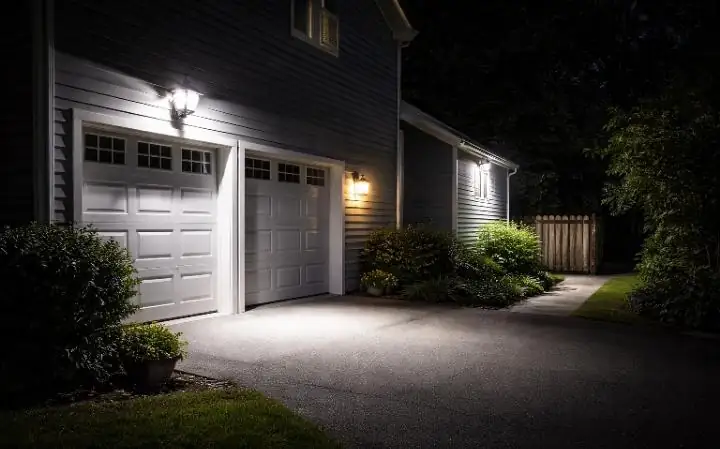
Motion-activated lights do two very important things: they startle anyone approaching your property, and they make it look like someone inside reacted to the movement. Most people install these and call it a day. But the positioning is everything, and most people get it wrong.
The mistake I see all the time? People put motion lights only at the front door. A burglar who’s done any scouting knows this. They approach from the side or the back — the less visible routes. Those are exactly the places your motion lights need to cover.
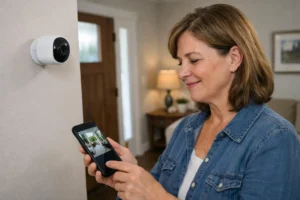
I’d also recommend pairing your motion lights with a camera that sends you phone alerts. That way, a light triggering at 2am isn’t just a deterrent — it’s also an alert. You can check the feed from wherever you are and know if it was a cat or a person sizing up your side gate. I’ve written a full guide on the best picks here: 7 Best Motion Sensor Lights to Deter Burglars.
📍 Where to position motion lights:
- Front driveway entry — standard, but still essential
- Side gate and side passages — most overlooked, most used by burglars
- Back garden/yard entry — especially near fences or low walls
- Garage approach — garages are a common soft entry point
- Under any large tree or shrub near the house — anywhere with natural cover
✅ PROS
- Works even during power outages (solar versions)
- No monthly subscription needed
- Extremely low-cost deterrent
- Alerts neighbors too
❌ CONS
- Can be triggered by animals (false alerts)
- Needs proper angle setup to be effective
- Some cheap models have poor detection range
- Solar models struggle in winter months
Keep the Lawn and Garden Looking Attended To
An overgrown lawn is a blinking neon sign that says “nobody home for a while.” I know it sounds basic, but you’d be surprised how many people go away for two weeks and come back to grass that’s knee-high and a flower bed that looks abandoned. That’s not just an eyesore — it’s a security risk.
The solution here depends on how long you’re away. For trips under a week, mowing just before you leave is usually enough. For anything longer, you need an arrangement. Either ask a neighbor or a friend to mow once while you’re gone, or hire a local lawn service for a single visit mid-trip.
Here’s a less obvious angle: leave a few garden tools casually placed around as if someone just used them. A hoe resting against the fence, a watering can by the flower bed — these visual cues suggest recent activity. It’s a small psychological trick, but it works.
- Mow and edge the lawn the day before you leave
- Arrange a lawn care visit for trips over 7 days
- Leave garden tools casually positioned (not stored away)
- Use a sprinkler timer so the garden is visibly watered regularly
- Don’t over-tidy — a “lived in” garden looks slightly imperfect
Install a Visible (or Dummy) Security Camera — But Do It Right
Security cameras are one of the strongest deterrents available — but only if they’re placed where they can actually be seen from the street or approach path. A camera hidden behind a bush does almost nothing as a deterrent, even if it captures great footage. The goal here is to be seen.
Now, real cameras are obviously best. They give you remote monitoring, alerts, and actual evidence if something does happen. I’ve put together a full walkthrough on how to set them up yourself: DIY CCTV Installation Guide 2026. It’s cheaper than you think — you can get a solid 4-camera setup for under $120 if you know what you’re buying.
But here’s what most guides won’t say: a realistic-looking dummy camera is 80% as effective at deterring casual break-ins. The majority of residential burglaries are opportunistic — a person spots what looks like an easy target. A visible camera, even a fake one, breaks that calculation instantly. The risk-reward stops making sense to them.
🎯 Camera placement that actually deters:
- Mount at 8–10 feet high, angled down — this is the “professional” look
- Aim one at the front door, one at the driveway — both visible from the street
- Add a small LED indicator light (even a fake blinking red light matters)
- Add a “CCTV in Operation” sign — it reinforces the visual deterrent
- Make sure the camera housing is visible, not hidden — the point is to be seen
For renters who can’t drill into walls, check out my full Apartment Security Guide — there are some really clever non-permanent options in there.
Use a Smart Doorbell — and Actually Respond to It While Away
A smart video doorbell is one of the best investments you can make for this specific situation. Here’s why: when someone approaches your door — whether it’s a delivery person, a salesperson, or someone casing the house — they ring or knock. If nobody answers, that’s confirmation. If someone answers from 500 miles away, that’s a surprise they’re not prepared for.
I use a Ring doorbell, and I’ve had multiple occasions while traveling where someone came to the door, I answered via the app, and they had no idea I wasn’t home. For delivery people, it’s useful. For anyone with bad intentions? It’s completely disorienting.
The full setup process is surprisingly simple — I’ve documented exactly how to install one without an electrician: DIY Doorbell Installation Guide 2026.
Ask a Trusted Neighbor to Do More Than Just “Keep an Eye Out”
Most people ask a neighbor to “watch the house.” That usually means nothing more than a vague agreement to glance at it occasionally. That’s not enough. What you need is a specific, activity-based arrangement that creates actual visible signs of occupancy.
I always sit down with my neighbor before a trip and we go through a specific checklist together. It takes ten minutes and it’s genuinely the most effective thing I do. Here’s what that actually looks like in practice:
- Park their second car in my driveway for at least a few days
- Put the bins out and bring them in on collection day
- Walk past or up the front path occasionally — visible footprints in winter help
- Collect anything left at the door immediately
- Change the position of any items left outside (a chair, a pot plant) once a week
That last one — changing the position of outdoor objects — is something almost nobody talks about. A garden chair or a pair of wellies that moves between visits signals regular activity far more convincingly than a static scene.
Always thank your neighbor well — and return the favor when they’re away. It builds genuine community vigilance, which is worth more than most security gadgets.
Use a TV Simulator or Smart TV to Create Audio-Visual Life Inside
This is one that most people either don’t know about or haven’t thought through properly. A TV flickering through a window at night is one of the most powerful “someone’s home” signals there is. It’s almost instinctive — when we see that light from outside, we assume a person is sitting in front of it.
You have two options here. The first is a dedicated TV simulator — a small LED device (like the FakeTV brand) that plugs into a socket and produces a flickering, color-changing light that looks remarkably like a TV from outside. It draws almost no power and costs about $25–$35. Connect it to a smart plug with a randomized schedule and you have a very convincing setup.
The second option is to use your actual smart TV. Most modern smart TVs can be turned on and off via app, and some (like Samsung SmartThings-connected models) can be scheduled. If you have one and it’s positioned near a window, this works brilliantly. Pair it with a low-volume smart speaker playing ambient sound — TV dialogue, music, background noise — and you’ve created a very convincing illusion of occupancy.
🔑 Extra trick: Place the simulator or TV in a room that faces the street. A light flickering in a back bedroom means nothing to someone walking past your front. Positioning matters — front-facing living room windows are the sweet spot.
| Method | Realism Level | Cost | Setup Effort |
|---|---|---|---|
| FakeTV simulator | High | $25–$35 | Plug and play |
| Smart TV on schedule | Very High | Free (if you own one) | App setup, 10 mins |
| Smart speaker with audio | Medium | $30–$50 | Schedule via app |
Never Announce Your Trip on Social Media Until You’re Back
This is the most uncomfortable one to talk about because it’s the most human. We all want to share our holiday photos in real time. It’s exciting. But broadcasting your location and absence to literally everyone who follows you — including people you’ve met once, acquaintances from years ago, and followers you’ve never met — is a real security risk that a lot of people underestimate.
It doesn’t take a criminal genius to connect “currently in Bali 🌴” with the address tied to your Facebook profile or the neighborhood you’ve tagged in posts before. There have been documented cases of targeted burglaries where the timing aligned suspiciously well with a homeowner’s public social media holiday announcements.
The rule I follow now: post everything after I’m back. I still take all the photos. I still capture all the moments. I just share them when I’m home. Nobody in my feed cares whether they’re seeing the Eiffel Tower “live” or three days later. But the difference in risk is enormous.
- Don’t post holiday photos until you’re home
- Avoid location tagging in your “home neighborhood” posts before you leave
- Check your privacy settings — are your posts really just for friends?
- Be careful about group chats too — you don’t know everyone in every group
- Tell only the people who absolutely need to know your travel dates
📊 What research shows:
According to the Insurance Information Institute, most residential burglaries happen during daylight hours when occupants are expected to be away — and opportunistic targeting based on known absence patterns is a recognized risk factor. Social media has made “absence broadcasting” easier than ever.
The “Broken Pattern” Trick — Leave One Thing Slightly Unusual
This is the one that almost nobody talks about — and honestly, it’s the one I’m most proud of discovering through trial and experience. It sounds counterintuitive, but it works on a deep psychological level.
When burglars scout a property, they look for consistency. A house that looks exactly the same every time they drive past — same lights, same car position, same everything — reads as predictable. Predictability equals confidence equals action. But a house that has something slightly different each time? That creates uncertainty, and uncertainty is the enemy of a burglar’s decision-making.
The trick is to leave something in a slightly unusual or “mid-task” state. Examples:
- A stepladder casually leaned against the wall outside — as if someone was cleaning gutters and stepped away
- A garden hose uncoiled and left pointing toward a flower bed
- A child’s bike or scooter left on the path (even if you don’t have kids — borrow one)
- A visible pair of muddy boots near the door
- A half-filled bucket near the car — as if someone just washed it
None of these things are expensive or complicated. But to someone watching from the street, they read as unfinished human activity. That unfinished quality is what creates doubt. And doubt, in this context, is protection.
Pair this with all the other secrets above and you have a layered, multi-sensory, multi-day illusion of constant occupancy that costs very little and requires almost no technology.
Quick Reference: All 10 Secrets at a Glance
| # | Secret | Cost | Effectiveness |
|---|---|---|---|
| 1 | Smart plugs with randomized schedule | $35–60 | ⭐⭐⭐⭐⭐ |
| 2 | Mail and parcel management | Free | ⭐⭐⭐⭐⭐ |
| 3 | Motion-activated outdoor lighting | $25–80 | ⭐⭐⭐⭐⭐ |
| 4 | Lawn and garden maintenance | Free–$50 | ⭐⭐⭐⭐ |
| 5 | Visible security camera (real or dummy) | $15–120 | ⭐⭐⭐⭐⭐ |
| 6 | Smart doorbell with remote answer | $50–180 | ⭐⭐⭐⭐⭐ |
| 7 | Trusted neighbor with specific tasks | Free | ⭐⭐⭐⭐⭐ |
| 8 | TV simulator or smart TV schedule | $25–35 | ⭐⭐⭐⭐ |
| 9 | Social media silence while away | Free | ⭐⭐⭐⭐ |
| 10 | Broken pattern / mid-task props | Free | ⭐⭐⭐⭐ |
🛡️ Do a Full Security Audit Before Your Next Trip
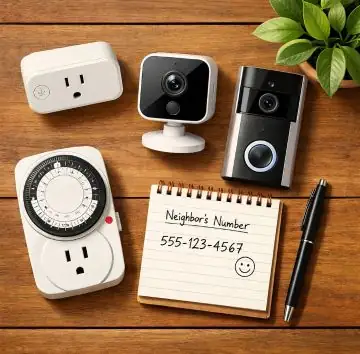
The secrets above are powerful, but nothing beats knowing exactly where your home is vulnerable. I always run through these free tools before any trip longer than two days:
Frequently Asked Questions
Final Thoughts
The goal was never to build a fortress. It was to be one step less attractive than the next house over. Burglars — especially opportunistic ones — are always doing a silent risk calculation. Every one of the secrets above tips that calculation firmly in your favor.
What I’ve found after years of doing this is that the most effective approach is layering. No single trick is foolproof on its own. But three or four working together — a randomized light schedule, a responsive doorbell, a trusted neighbor collecting mail, and a camera visible from the street — create a picture of a home that’s just too risky to touch.
And yes — most of this is achievable for well under $100. Start with the free things (mail hold, neighbor briefing, social media discipline), then layer in smart plugs and a camera over time. You don’t need to do everything at once.
Before your next trip, I’d recommend running through the Home Security Checklist Generator — it takes five minutes and makes sure nothing obvious gets forgotten in the rush of packing. And if you want to know exactly where your home stands security-wise, the SecureScore Calculator gives you a clear, honest rating.
Travel without the worry. That’s what all of this is really about.
📚 Keep Reading

Borni Franklin is the founder of LotsHomeGuide and a home security researcher with over 5 years of experience studying real-world burglary patterns, property vulnerabilities, and practical protection strategies. He has tested home security products, analyzed how intruders select targets, and built free tools to help everyday homeowners assess and improve their safety. Every article on LotsHomeGuide is written from hands-on research — not recycled generic advice. Based in the USA. Read full information about Borni Franklin on our About Us page.